
Riegel – Windows hardening check for plants, labs and control rooms
Hardened where it can be. Documented where it can’t.
Riegel is an offline Windows hardening checker for machines in plants, laboratories and control rooms: it reads the security configuration without changing it, checks it against 153 rules, keeps what is deliberately open as justified and approved exceptions, and writes a report to sign. It checks Windows 7 SP1 to 11 and Windows Server 2008 R2 to 2025; Riegel is free of charge under the MIT licence.
Coming soon: Download and source code will be published with the public release. If you would like to test ahead of it, sign up for the beta – we will get back to you personally.
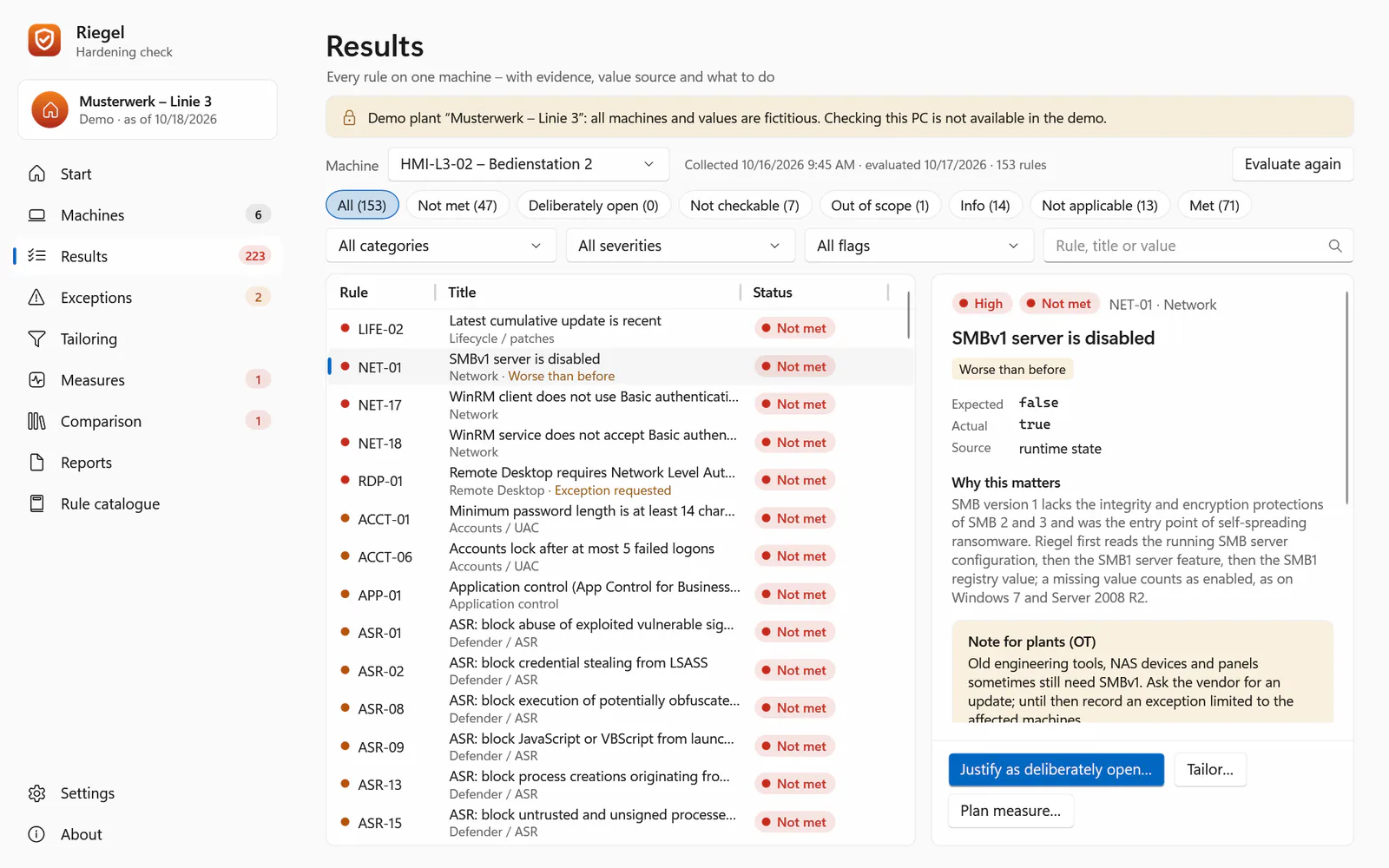
Evidence of hardening for the Windows machines nobody manages centrally
Plant PCs, HMIs, lab and control-room machines often sit outside central IT – some without a network, some with software that needs an insecure setting. On such machines, installing software is a change in itself – a Windows hardening assessment there has to work without an installer.
Riegel therefore brings a portable collector that installs nothing, changes no configuration and writes only its export; Windows itself records that a program ran. The evaluation happens on an analysis PC: a result per rule, justified exceptions, a comparison with the approved state and a report to sign.
What the Windows hardening check does
-
153 rules, honest results
Network, credentials and NTLM, LSA, Defender and ASR, application control, encryption, firewall, audit and PowerShell, RDP, removable media and TLS. A pass needs positive evidence; what could not be read is “not checkable”, never a silent pass.
-
Portable collector
About 130 KB, for Windows 7 SP1 to 11 and Server 2008 R2 to 2025; installs nothing and changes no configuration. Where no foreign program may run, Windows’ built-in commands work;
--minimalstarts no other program on sensitive HMIs. -
Justified, approved exceptions
What stays open deliberately gets a justification, the accepted value, an approving role and a change or QMS record – bound to its content, with expiry and history. Tailoring per role and a measures plan sit beside it.
-
Comparison with the approved state
What changed since commissioning or a vendor visit? Riegel compares with the previous run and with the approved state – worse first, then raw-value drift.
-
Documents to sign
Plant report with sign-off, management summary, target configuration, approval sheet and collection record as PDF, plus Excel, CSV and an evidence pack that auditors re-check with
verify– also on Linux. -
Remediation as files only
.reg files with a rollback, GptTmpl.inf and audit.csv for the plant vendor – never applied by Riegel.
-
Your own baselines
Import GPO backups, including those inside downloaded security baselines, or write your own requirements as JSON or CSV.
-
Monitoring that alerts on change
Nagios-style exit codes and an Icinga line for regressions, newly open high findings, expiring exceptions and overdue measures.
Where the security baseline rules come from
Catalogue 2026.10.1 has 153 rules in 17 report categories, with texts written by ICT Baden. Every expected value is backed by the ACSC, Microsoft’s Windows Server documentation, a Microsoft Learn page or a DISA STIG; Microsoft Security Baselines only corroborate. References name MITRE ATT&CK mitigations and Grundschutz++ identifiers. The catalogue contains no CIS and no BSI SiSyPHuS content.
For machine builders there is an “as delivered” report preset with the machine identity and the justified deviations of the machine’s software; Riegel.Cli.exe check also runs in the factory acceptance test (FAT).
For audits: NIS2, ISO 27001, IEC 62443, GMP
Riegel supports evidence for NIS2 and the documentation duty of § 30 BSIG, ISO/IEC 27001:2022 A.8.9, IEC 62443, TISAX, insurer questionnaires and GMP periodic reviews. It makes no compliance claim, is not a validated system, and covers configuration management – not MFA, backups, incident handling or network segmentation.
Switching from benchmark scanners and policy comparison tools: Riegel as an alternative
If you check Windows hardening with a benchmark scanner or a policy comparison tool today, Riegel does the same job: comparing a machine’s security configuration with expected values. Its focus is different:
-
Offline and read-only
A portable collector (about 130 KB) installs nothing, changes no configuration and opens no network connection; the evaluation runs on another PC.
-
Justified exceptions
What stays open deliberately is recorded with a justification, an approving role, a record and an expiry date.
-
A report to sign
Plant report as PDF with sign-off and an evidence pack that auditors re-check with
verify. -
Built for plant PCs
Designed for Windows 7 SP1 to 11 and Server 2008 R2 to 2025,
--minimalfor sensitive HMIs, Windows’ built-in commands, an “as delivered” report preset for machine builders.
Important if you are looking for an alternative to a benchmark scanner: Riegel contains no content from third-party benchmark catalogues and no BSI SiSyPHuS content. Its own catalogue of 153 rules is backed by ACSC, Microsoft documentation and DISA STIGs, so a Riegel result is no statement about conformance with a particular benchmark. Your own baselines can be imported as GPO backups, including those inside security baselines you downloaded yourself. Rule files and checklists of other hardening tools are not imported in Riegel 0.1 (planned for 0.2). Riegel is free of charge under the MIT licence, needs no licence server, and never applies settings itself.
System requirements
- Checked machines
- Windows 7 SP1 to 11 and Windows Server 2008 R2 to 2025 via the portable collector (.NET Framework 3.5.1 or 4.x)
- Without foreign programs
- Windows’ built-in commands (secedit, auditpol, reg) via collect-builtin.cmd
- Analysis PC
- Windows 10 version 1809 or Windows Server 2019 or later – MSI or Riegel.exe without installation
- Linux
- command line for x64 and arm64 to evaluate and verify evidence packs
- Network
- none – Riegel opens no network connection
- Language
- German, English, Spanish, French, Chinese (the last three machine pre-translated)
Limits, honestly
- Pre-release 0.1 (latest 0.1.2, collector 0.1.0), not code-signed: SmartScreen may warn, and the collector can only be allow-listed by hash. No customer pilot on OT or validated machines before the collector is signed.
- Windows targets only: Linux machines are not checked. Machine settings only, no per-user policies; domain controllers get no score.
- Tested on fixtures and CI runners (Windows Server 2022 and 2025, Windows 11 Arm64) and against a reference snapshot of a Windows 11 workstation; not yet on real Windows 7, 8.1, 2008 R2 or 2012 R2 machines, in a real domain, with third-party antivirus or EDR, or with real AppLocker enforcement. Domain GPO attribution is experimental.
- Without administrator rights, with
--minimalor from built-in commands, many rules cannot be decided; the report then says “Incomplete check”. - No PDF/A, no electronic signatures; the evidence pack is not signed.
- Spanish, French and Chinese are machine pre-translations, marked in every document; rule texts are English there.
What Riegel looks like
Screenshots from the demo mode with the fictitious plant “Musterwerk – Linie 3”.
-
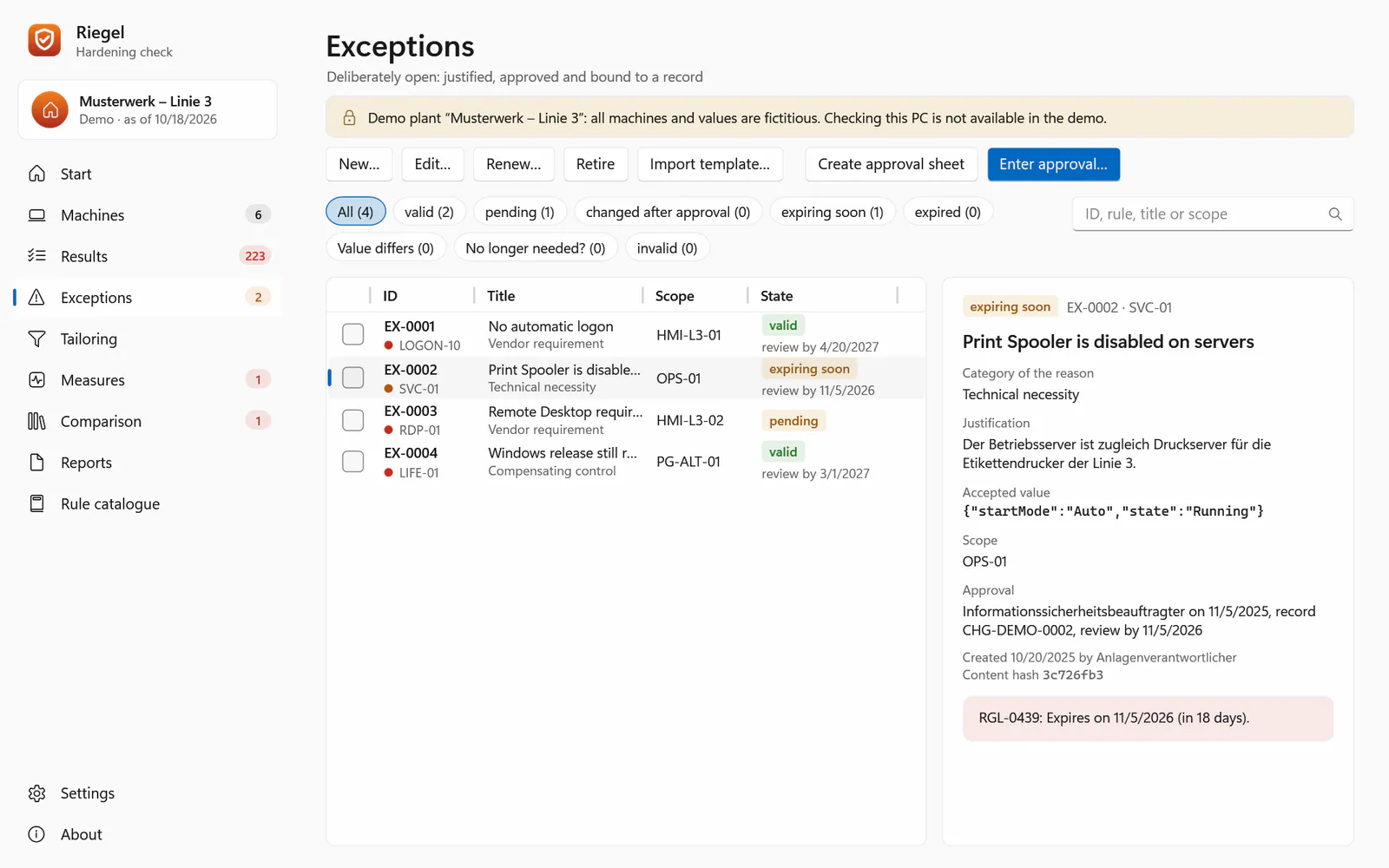
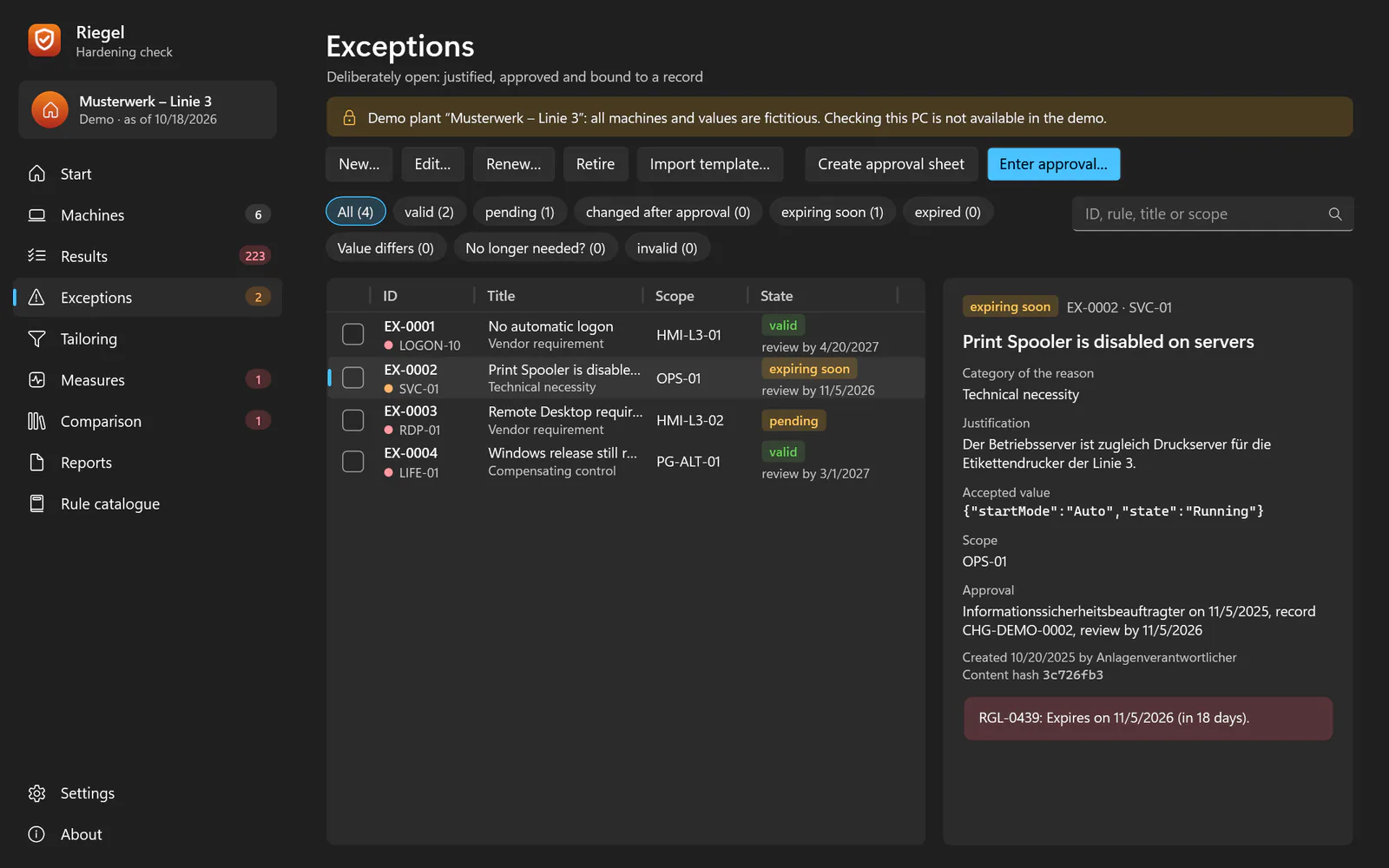
Deliberately open, approved Exceptions with a justification, the accepted value, an approving role and a change or QMS record – bound to their content, with expiry and history. -
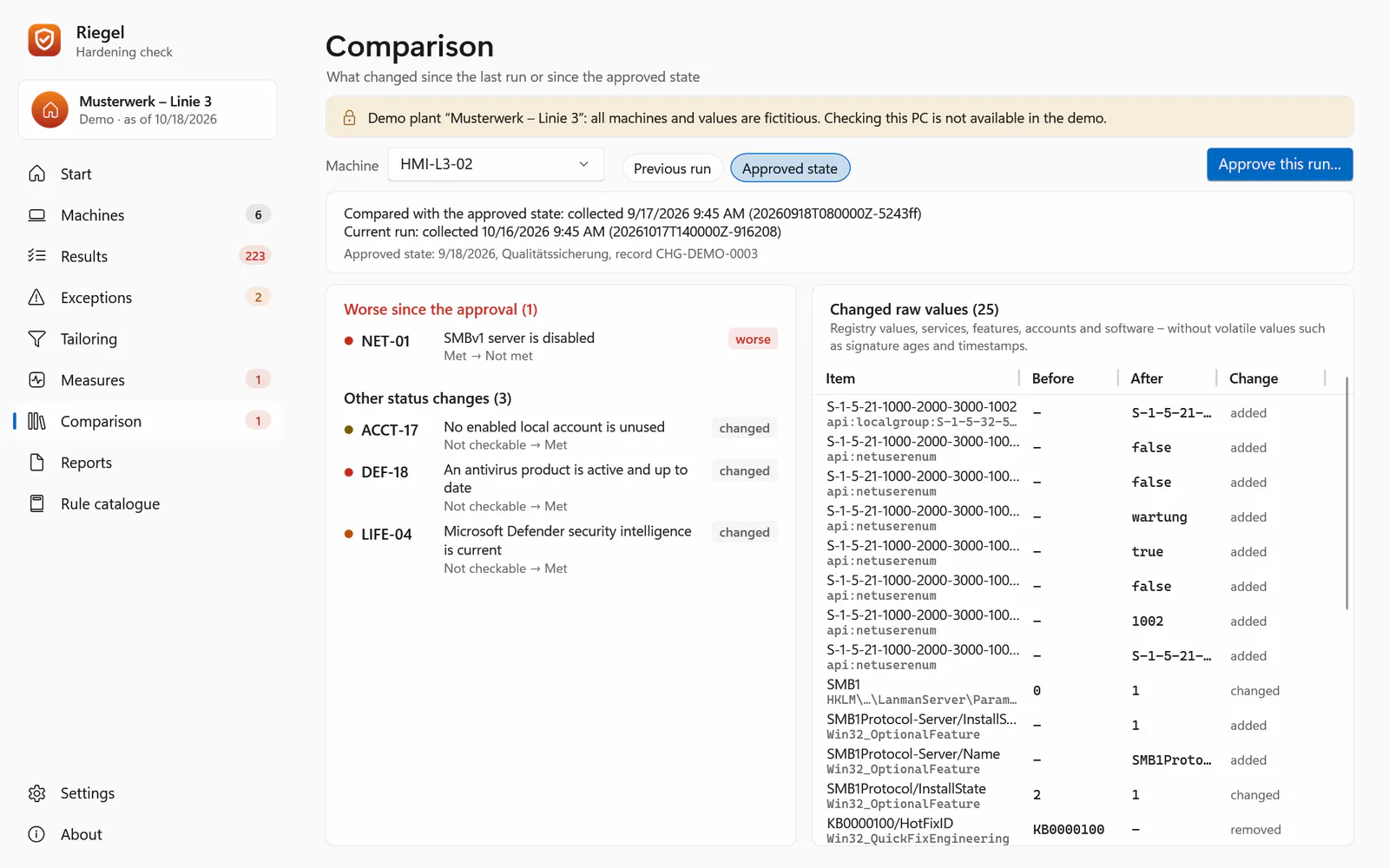
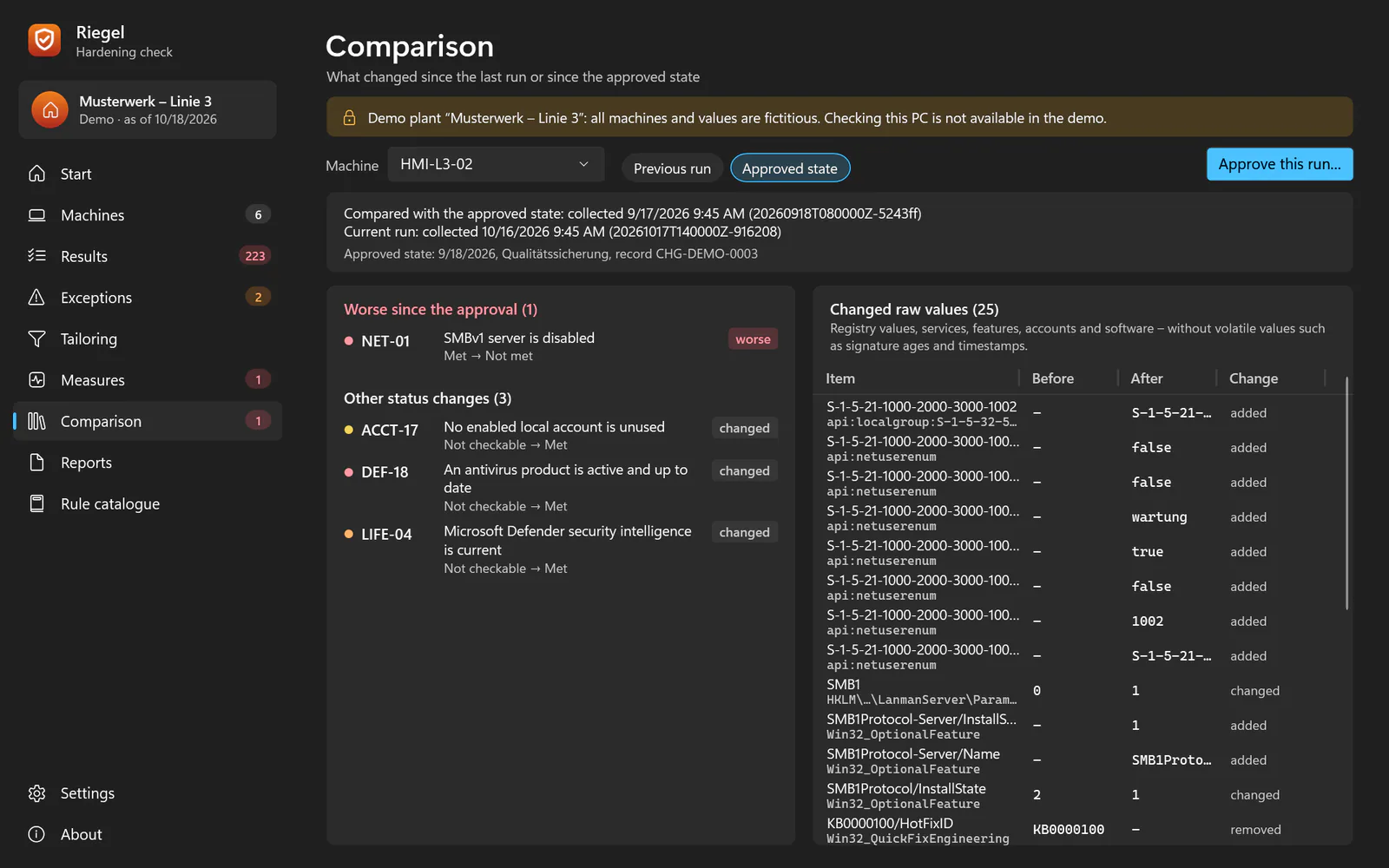
What changed since approval? Comparison with the previous run and with the approved state after commissioning or a vendor visit: worse first, then raw-value drift. -
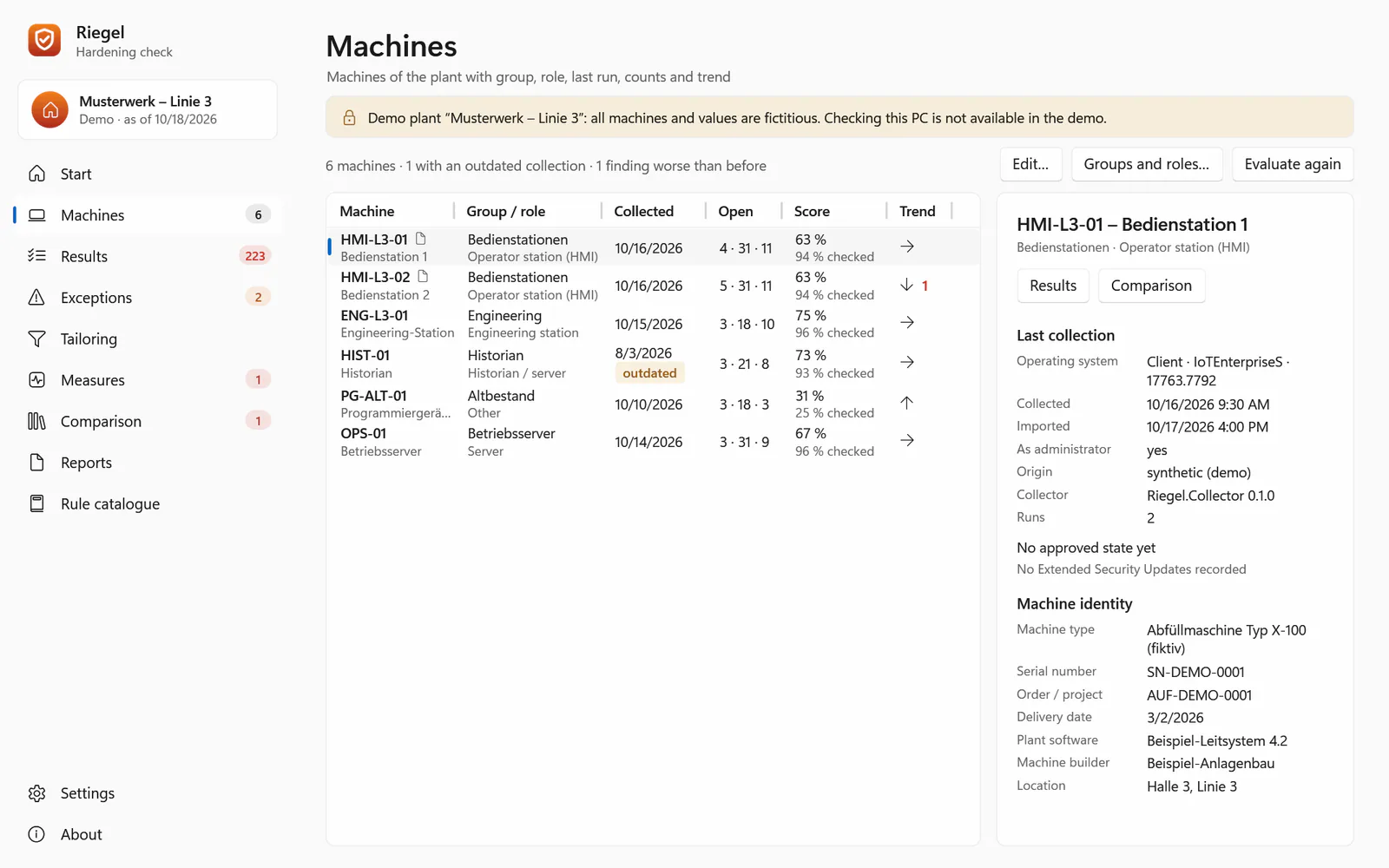
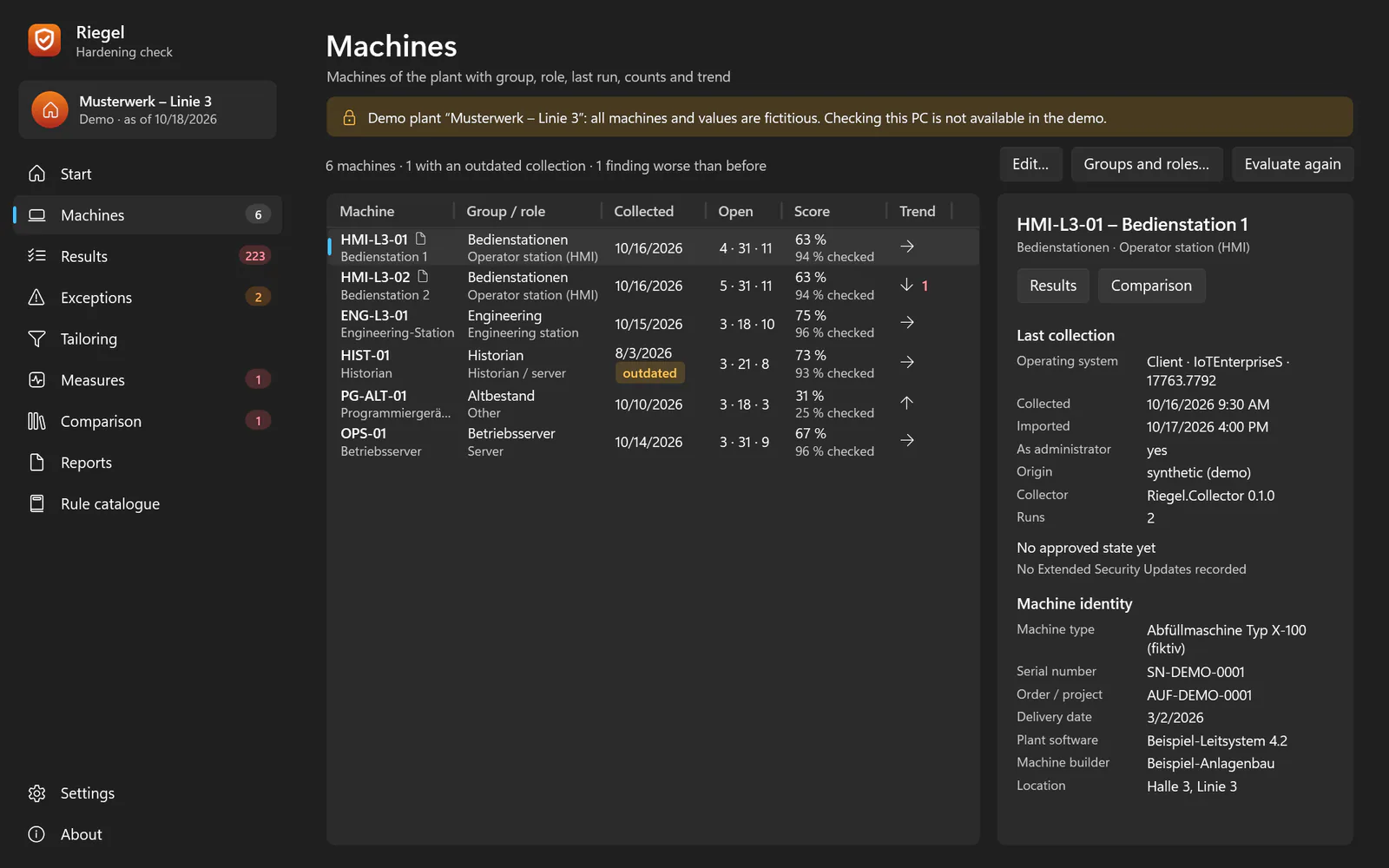
A plant folder, not a server Machines, groups and roles, snapshots, runs and registers as readable JSON files in one folder – on a stick, a share or under the customer's change control. -
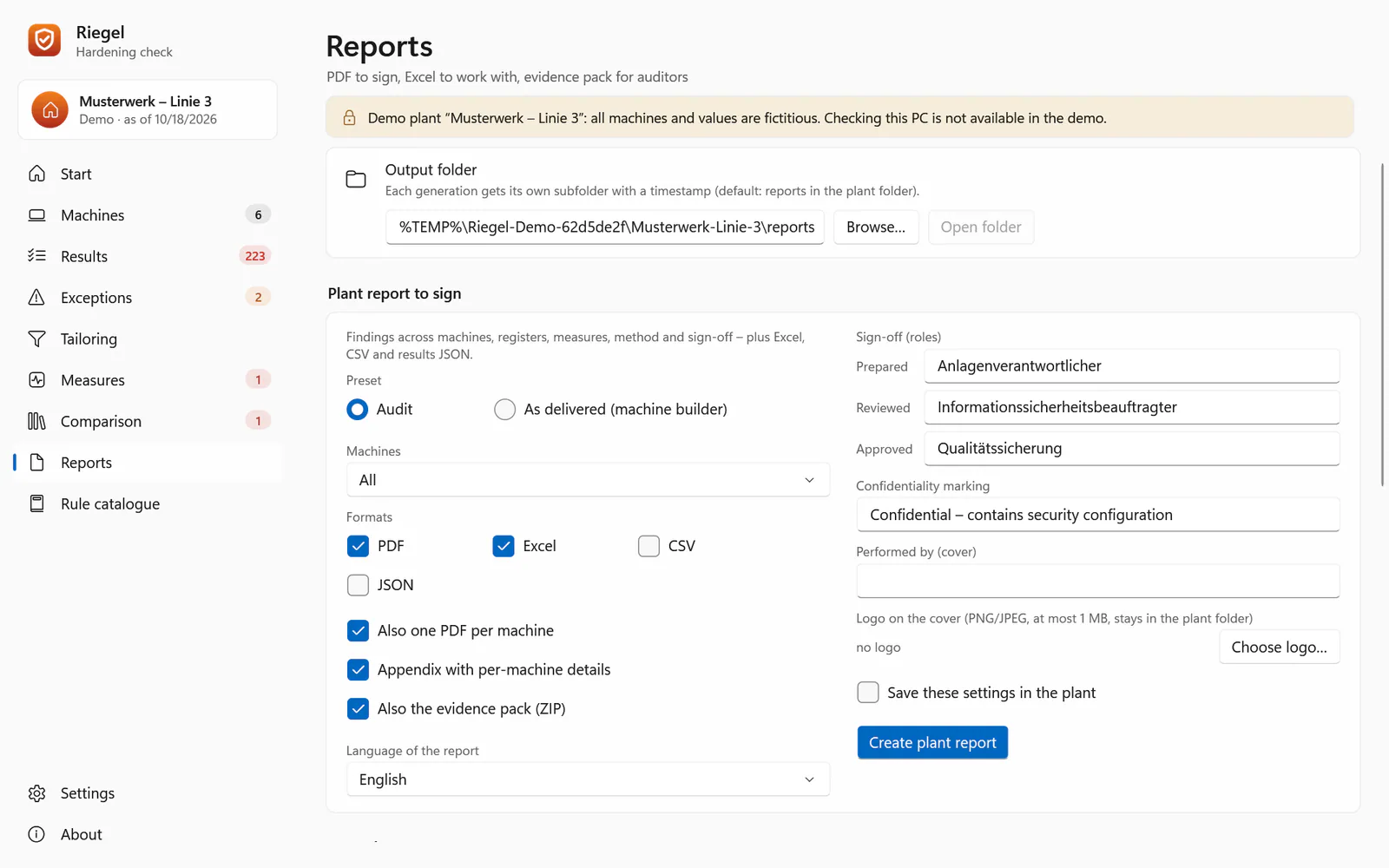
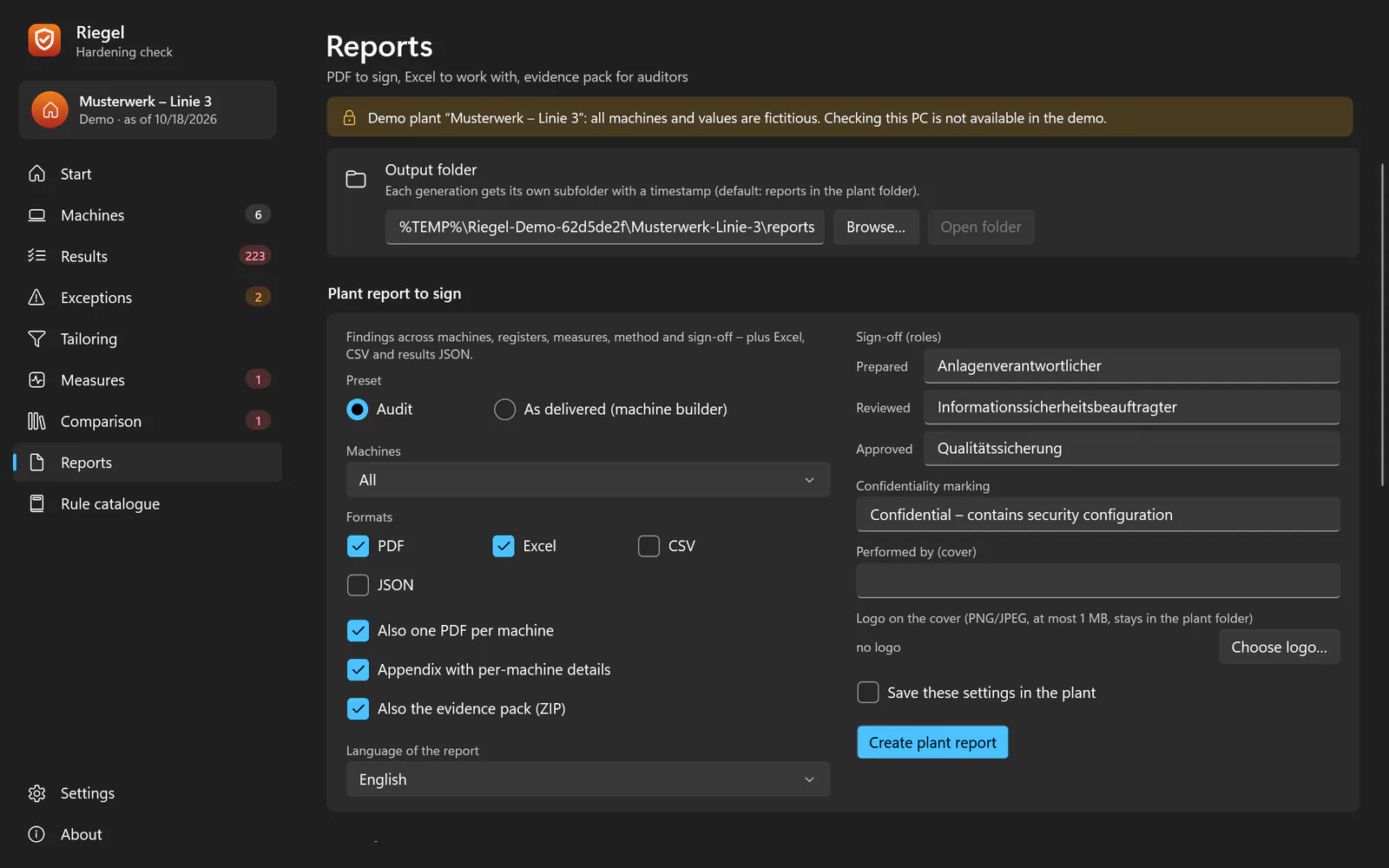
Documents to sign Plant report with sign-off, one-page summary, target configuration, approval sheet, collection record, Excel, CSV and an evidence ZIP that auditors re-check with verify.
Frequently asked questions
How do I run a security baseline check to see whether a Windows machine is hardened?
With Riegel: run the portable collector on the machine, import the snapshot on an analysis PC and evaluate it against 153 rules. The result shows status, expected and actual value, source and why it matters for every rule.
Can I run a system hardening audit without installing software on the plant PC?
Yes. The collector installs nothing, changes no configuration and writes only its export; Windows itself records that a program ran. Where no foreign program may run, Windows’ built-in commands work.
Does the Windows hardening check work offline, on air-gapped machines?
Yes. Riegel opens no network connection. The collector runs from a USB stick, and the snapshot travels to the analysis PC the same way.
Can I audit Windows 7 or Server 2008 R2?
The collector is built for Windows 7 SP1 to 11 and Server 2008 R2 to 2025 and needs .NET Framework 3.5.1 or 4.x. It has not been tested on real Windows 7 and 2008 R2 machines yet.
What if the plant software needs an insecure setting?
Record the finding as a justified exception: justification, accepted value, approving role and a record from the change or QMS process. The exception is bound to its content, expires and keeps a history.
Is the hardening evidence report enough for NIS2, ISO 27001 or IEC 62443?
Riegel supports evidence for configuration management, e.g. ISO/IEC 27001:2022 A.8.9, NIS2 and IEC 62443. It makes no compliance claim; whether the evidence is sufficient is up to your audit.
Does Riegel contain content from CIS or BSI SiSyPHuS?
No. The catalogue has its own texts; expected values are backed by ACSC, Microsoft documentation or DISA STIGs. Your own baselines, e.g. from GPO backups, can be imported.
Can I check Windows machines against my own security baseline?
Yes. Riegel imports GPO backups, including those inside security baselines you downloaded yourself, or your own requirements as riegel.baseline/1 JSON or CSV. Each imported baseline is evaluated in the same run as the catalogue and gets its own section in the reports. Riegel itself ships no baseline content.
Is Riegel free? Does it send data?
Riegel is free of charge under the MIT licence. It has no network code, no telemetry and no update check, and sends no data to ICT Baden. The download follows with the public release.
Is there a free alternative to benchmark scanners for checking Windows hardening?
Riegel checks Windows machines read-only and offline against its own catalogue of 153 rules and is free of charge under the MIT licence. It contains no content from third-party benchmark catalogues: if you need to show conformance with a particular benchmark, Riegel does not give you that statement. The download follows with the public release.
How does Riegel differ from policy comparison tools?
Such tools and Riegel all compare Windows settings with expected values. Riegel separates collection from evaluation: a portable collector reads the machine offline and read-only, and the evaluation runs on another PC. It adds justified, approved exceptions, a comparison with the approved state and a report to sign. Riegel never applies settings itself; remediation comes as files only.
Related products


Windows, PowerShell, Defender and Excel are trademarks of the Microsoft group of companies, Linux is a registered trademark of Linus Torvalds. CIS (Center for Internet Security) and the BSI are named only to say that Riegel contains no content from them. Standards and frameworks are only described; Riegel is neither audited nor certified by their publishers.
Contact
Interested in Riegel?
Tell us what you would like to use the product for – we will get back to you personally.