Industrial Kiosk Browser – Kiosk browser for rugged Android devices
Web apps on rugged Android devices.
Industrial Kiosk Browser (formerly Pforte and EnterpriseBrowser) is a kiosk browser for rugged Android devices, for example from Zebra and Honeywell: it opens your web apps, types barcode scans straight into the focused input field and is configured centrally through your MDM. For Android 8.0 or later, free of charge under the MIT licence.
Industrial Kiosk Browser is an independent product of ICT Baden and is not affiliated with Zebra Technologies or Honeywell.
Available on Google Play – the store listing will appear shortly. Until then we provide the app on request.


An industrial browser for web apps on rugged handhelds
Goods receipt, picking or shipping often run as web apps. On a handheld with a built-in scanner, that takes a browser that puts the scan into the right field, opens only allowed pages and cannot be changed by anyone who picks up the device. Industrial Kiosk Browser is built for exactly that: a lean kiosk browser for handheld computers, based on Android WebView and written in Kotlin.
Replacing terminal emulation with web apps, for example SAP ITS mobile? Industrial Kiosk Browser is the browser for the handhelds. It is a web browser itself, not a terminal emulator.
Kiosk browser for Zebra devices: scan a barcode straight into a web form
Scans from Zebra DataWedge, Honeywell or any scanner app via intent are typed into the focused field like keyboard input, optionally followed by Tab or Enter – and reported as the JavaScript event industrialkioskbrowser:scan as well. Existing web apps work without changes: input and change events fire, so React and Vue pick up the value. On start, the app creates its own DataWedge profile “Industrial Kiosk Browser” and leaves the decoder settings alone.
The generic scan broadcast, which any app can send, is accepted by default only on devices without a Zebra or Honeywell scanner; the scanner.genericIntent setting turns it on everywhere or off completely.
Features of the kiosk browser for Android
-
Profiles
Start URL, allowed hosts, user agent, viewport and colours per profile – several web apps on one device, optionally opened at app start.
-
Kiosk mode
Hide toolbar and system bars, hide exit or protect it with a password, lock task as a dedicated device (device owner).
-
URL allow list
With an allow list, the browser only navigates to allowed hosts and their subdomains; navigations and form posts to other hosts are stopped before they load.
-
For web developers
The
scannerandScannerNavigatemeta tags control scanning per page; thewindow.IndustrialKioskBrowserJavaScript API for scanner, beep, vibration and toasts is available on allowed hosts only. -
Keyboard and keys
On-screen keyboard only on demand, hardware key remapping, hotkeys and macros such as
{F1}or{TAB}. -
Custom CSS and JavaScript
Add your own CSS, JavaScript or HTML to third-party web apps – matched by URL, without flicker.
-
Custom design
Title, subtitle, logo, brand colour and profile colours – via configuration or right in the app. Clear error pages with codes such as
IKB-0001in the brand colour. -
Security
Strict TLS checks, client certificates, passwords stored only as PBKDF2 hashes; configuration from other apps only with the admin password or on EMM-managed devices, locked for 15 minutes after 5 wrong attempts. Every release includes an SBOM (CycloneDX).
Deployment: SOTI MobiControl, Intune, Workspace ONE, StageNow
Distribute the APK with your MDM or install it with adb. The configuration comes as a managed configuration from any Android Enterprise EMM (key config_json), as a file industrialkioskbrowser.json – on Zebra devices also persistently in /enterprise/usr –, as a StageNow intent or as a QR code. There is a step-by-step guide for SOTI MobiControl.
Ready-made templates cover a single web app, full kiosk mode, several profiles with custom branding, injections with key remapping, and SAP ITS mobile with Enter after each scan.
Switching from commercial industrial browsers with a per-device subscription: Industrial Kiosk Browser as an alternative
For teams that run web apps on rugged Android devices with a commercial industrial browser licensed per device on subscription today and are looking at a free option. Industrial Kiosk Browser does the same core job – open web apps in kiosk mode and bring barcode scans into the web form – and is free of charge under the MIT licence: no licence server, no subscription, no device binding.
- Scans from Zebra DataWedge, Honeywell or any scanner app via intent are typed into the focused field, optionally followed by Tab or Enter; web apps work without changes.
- Kiosk mode, URL allow list, profiles, custom design, custom CSS and JavaScript.
- Configuration as JSON via managed configuration from any Android Enterprise EMM, as a file, via StageNow or as a QR code.
- No telemetry, no account.
Honestly, for anyone switching: Industrial Kiosk Browser is a web browser only, not a terminal emulator (Telnet, 5250, 3270, VT). It does not support the vendor-specific JavaScript APIs or configuration files of such browsers; web apps built on them use keyboard input, the industrialkioskbrowser:scan event or the window.IndustrialKioskBrowser JavaScript API instead. Industrial Kiosk Browser is a pre-release (0.x).
System requirements
- Operating system
- Android 8.0 or later
- Scanner
- Zebra DataWedge, Honeywell (Intent API of the Data Collection Service) or any scanner app via intent
- Distribution
- APK via MDM or adb; Google Play is prepared
- Language
- English and German; Spanish, French and Chinese machine-translated
Limits, honestly
- The Honeywell integration follows the vendor’s documented intent API and has not been verified on a Honeywell device yet; Android 8–10 is covered by unit tests only.
- An empty allow list allows every host – always set one on kiosk devices.
- Deliberately for intranets: plain HTTP and user-installed CA certificates are accepted, and the JavaScript API is also offered to http pages of allowed hosts. Use HTTPS wherever possible.
- Real kiosk mode (lock task) needs an EMM in dedicated device mode (device owner); without it, Industrial Kiosk Browser only hides the exit.
- The JavaScript API is not available on servers with a non-default port; scans, the scan event and the meta tags still work there.
- Renamed in 0.7.0 (formerly Pforte and EnterpriseBrowser): Android treats Industrial Kiosk Browser as a new app – there is no in-place update; roll out the configuration again and remove the old app.
- Builds under the new package name are signed in CI with the ICT Baden release key; the first tag release under the name Industrial Kiosk Browser is still to come. Google Play is prepared but not published yet.
- Version 0.x: settings, JSON format and JavaScript API may still change. Spanish, French and Chinese are machine translations.
- The screenshots are rendered from the UI code and placed in a neutral device frame, not photographed on a device.
What Industrial Kiosk Browser looks like
The images are rendered straight from the app’s user interface (neutral device); names and addresses are examples.
-
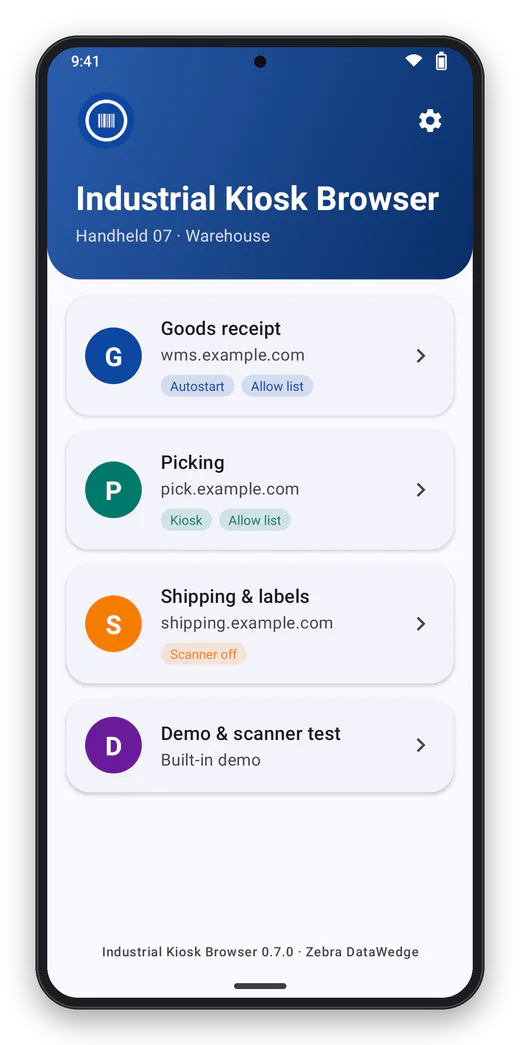
Profiles One tap opens the web app. Several web apps on one device, each with its own start address and rules. -
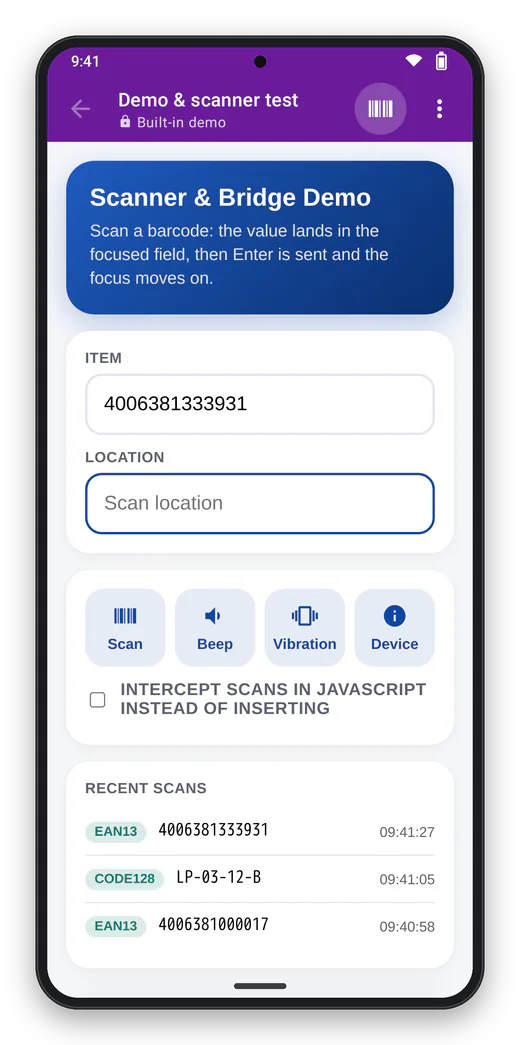
Scanning The barcode goes into the field, optionally followed by Tab or Enter – and as a JavaScript event for the web app. -
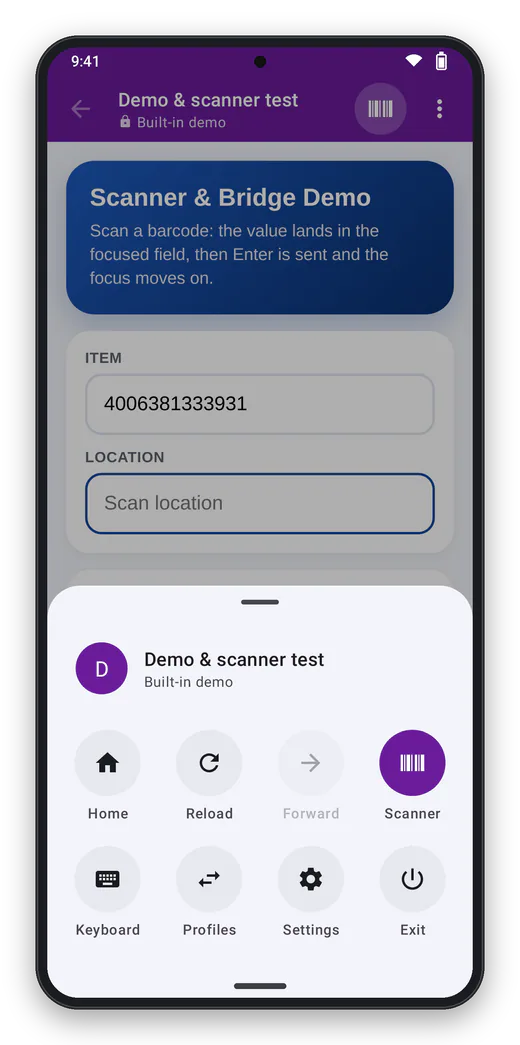
Menu Everything within thumb reach. -
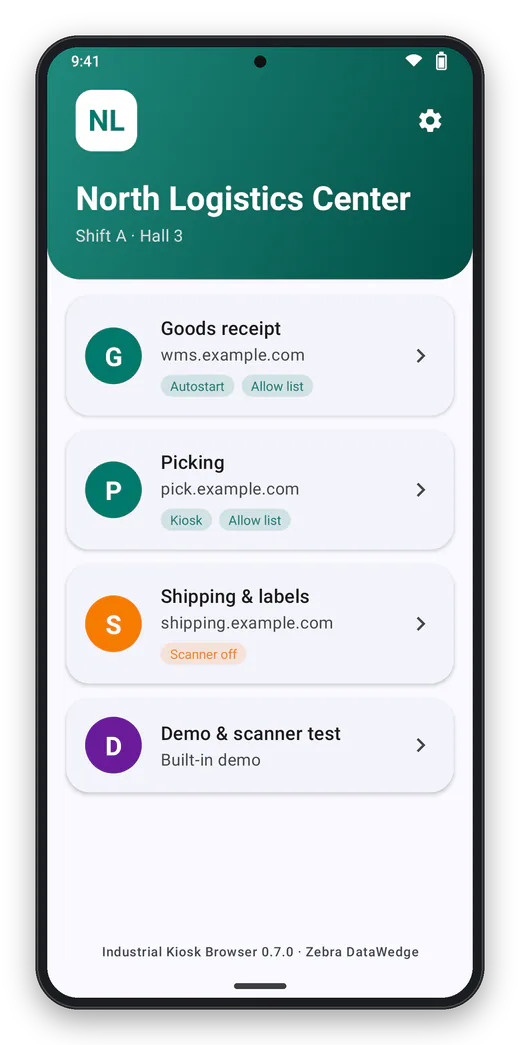
Custom design Title, subtitle, logo and brand color come from the configuration – or are set right in the app. -
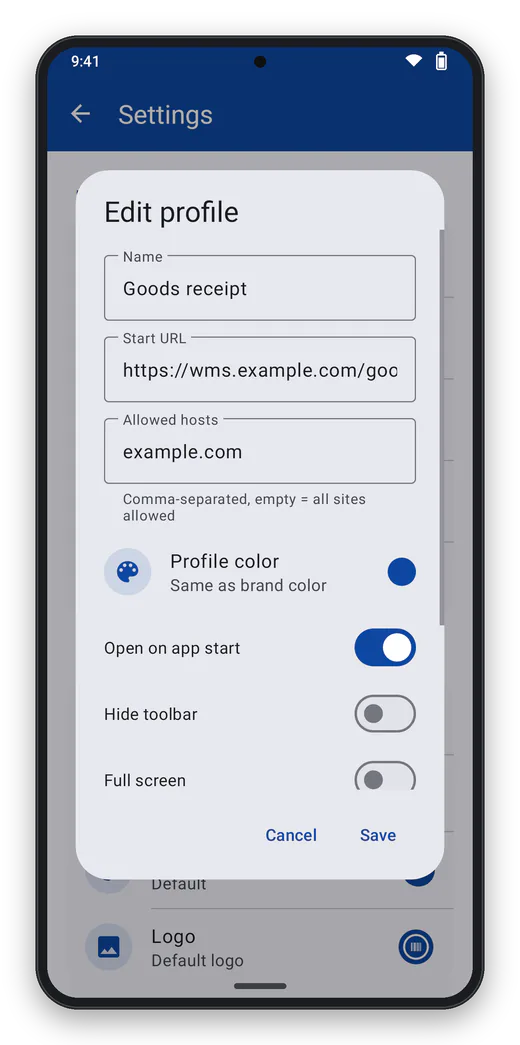
Profile with its own color Every profile can have its own color, which also tints the toolbar inside the web app. -
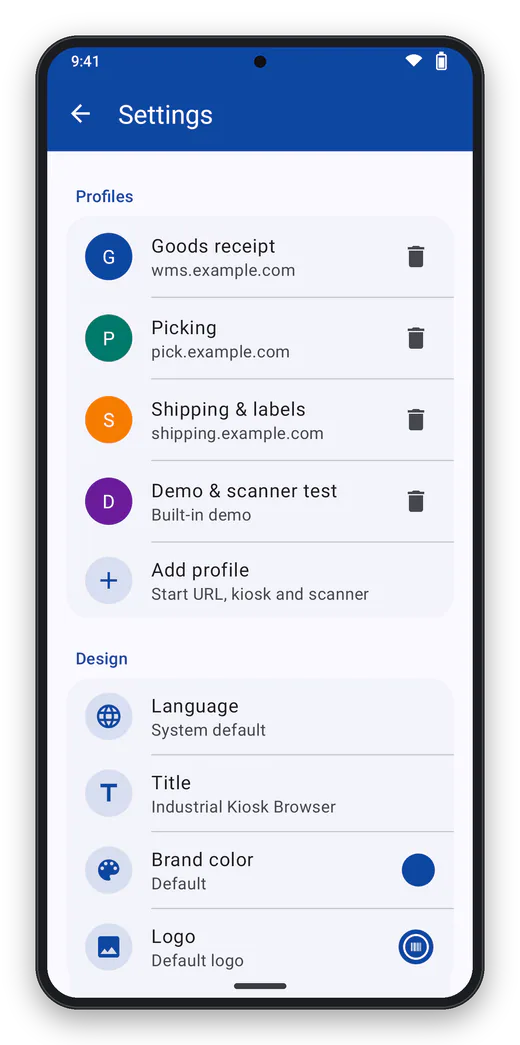
Settings Password protected: profiles, design and configuration.
Frequently asked questions
Which kiosk browser works for web apps on Zebra devices with DataWedge?
A kiosk browser that brings DataWedge scans into the web app. Industrial Kiosk Browser creates its own DataWedge profile on start and types every scan into the focused input field, optionally followed by Tab or Enter.
Do I have to change my web app for the scanner?
No. The scan arrives like keyboard input; input and change events fire, so React or Vue apps pick up the value. For more control, use the industrialkioskbrowser:scan event, the meta tags or the window.IndustrialKioskBrowser JavaScript API.
How do I lock an Android device to a single web app?
With kiosk mode: a profile with start URL and allow list, hidden toolbar and system bars, exit hidden or password-protected and – as device owner – lock task mode.
How do I deploy browser and configuration with SOTI MobiControl, Intune or StageNow?
Distribute the APK with your MDM. The configuration comes as a managed configuration (key config_json), as a file industrialkioskbrowser.json, as a StageNow intent or as a QR code; there is a step-by-step guide for SOTI MobiControl.
Is Industrial Kiosk Browser a terminal emulation replacement for web-based warehouse apps?
For web apps, yes: Industrial Kiosk Browser brings scans into the web form, locks the device to the application and is deployed through your MDM. There is a ready-made template for SAP ITS mobile with Enter after each scan and a device-width viewport. It is not a terminal emulator for hosts that have not moved to the web yet.
Does Industrial Kiosk Browser work with Honeywell scanners?
Yes, through the Intent API of the Honeywell Data Collection Service, and with any scanner app that sends scans by intent. A test on a Honeywell device is still open.
Does the browser send data to ICT Baden?
No. No telemetry, no crash reports, no update check, no account. The browser connects only to the web apps you configure and the pages they lead to. As usual, the Android System WebView checks addresses with Google Safe Browsing.
Did Industrial Kiosk Browser have a different name before?
Yes. Up to version 0.5.0 it was called EnterpriseBrowser, in the 0.6.x versions Pforte. Since 0.7.0 it is called Industrial Kiosk Browser, matching Industrial Keyboard, with the package name de.ictbaden.industrialkioskbrowser. Android and the EMM therefore see it as a new app: distribute Industrial Kiosk Browser, roll out the configuration again (same JSON format, file now industrialkioskbrowser.json) and remove the old app. The JavaScript API, scan event, DataWedge profile and error codes (IKB-…, same numbers as PFT-… and EB-…) changed with the name.
What does Industrial Kiosk Browser cost?
Nothing: Industrial Kiosk Browser is free of charge under the MIT licence, with no ads and no in-app purchases. Support with agreed response times is available with a support contract. The download follows with the public release.
Is there a free alternative to commercial industrial browsers with a per-device subscription for web apps?
Yes, for web apps: Industrial Kiosk Browser is a kiosk browser for rugged Android devices, free of charge under the MIT licence, with no ads and no in-app purchases. It brings scans from DataWedge, Honeywell or any scanner app via intent into the web form and is configured through your MDM. It does not offer terminal emulation or the vendor-specific APIs of such browsers.
Related products
Industrial Kiosk Browser is an independent product of ICT Baden and is not affiliated with Zebra Technologies or Honeywell. Zebra, DataWedge and StageNow are trademarks of Zebra Technologies, Honeywell is a trademark of Honeywell International; QR Code is a registered trademark of DENSO WAVE INCORPORATED; SOTI MobiControl, Microsoft Intune, Workspace ONE, SAP and Android are trademarks of their respective owners. They are named only to describe compatibility.
Contact
Interested in Industrial Kiosk Browser?
Tell us what you would like to use the product for – we will get back to you personally.